
AutoCAD or Civil 3D? A Complete Comparison for Civil Engineers
Quick Summary:
1. AutoCAD Builds Civil Drafting Foundations – Ideal for 2D drawings, layouts, and technical documentation used in everyday civil engineering work.
2. Civil 3D Enables Data-Driven Design – A powerful 3D civil software designed for roads, surfaces, grading, and infrastructure modeling.
3. AutoCAD vs Civil 3D Serves Different Purposes – AutoCAD focuses on drafting accuracy, while Civil 3D focuses on intelligent, model-based workflows.
4. Civil 3D Improves Productivity and Accuracy – Automation reduces manual errors and speeds up complex civil design tasks.
5. Learning Both Boosts Career Growth – Engineers skilled in both civil CAD software tools are more employable in modern infrastructure projects.
Choosing the right design software plays a major role in a civil engineer’s career. With the growing demand for digital planning and smart infrastructure, understanding the difference between AutoCAD vs Civil 3D has become more important than ever. In this blog, we will clearly explain what AutoCAD and Civil 3D are, how AutoCAD is used in civil engineering, what makes Civil 3D a powerful 3D civil software, and how both tools differ in real-world civil design workflows. By the end, you’ll know which civil CAD software best suits your learning and career goals.
What Is AutoCAD?
AutoCAD is a general-purpose computer-aided design (CAD) software developed by Autodesk. It is widely used across engineering disciplines for creating accurate 2D drawings and basic 3D models. Due to its flexibility and simplicity, AutoCAD is often the first design software civil engineers learn.
AutoCAD focuses on drafting precision, drawing standards, and technical documentation. It works using lines, arcs, polylines, layers, and annotation tools, making it ideal for creating clear and professional construction drawings.
AutoCAD for Civil Engineering
AutoCAD for civil engineering is primarily used for drafting and documentation rather than complex modeling. It acts as the foundation for understanding civil design concepts and drawing standards.
Key Applications of AutoCAD in Civil Engineering
Civil engineers use AutoCAD for:
● Site layout plans
● Road alignment drawings
● Structural detailing (columns, beams, footings)
● Drainage and utility layouts
● Survey drawing interpretation
● As-built drawings and shop drawings
AutoCAD allows engineers to produce clean, industry-standard drawings that contractors and site engineers can easily understand.
Why AutoCAD Is Important for Civil Engineers
AutoCAD remains essential in civil engineering because it builds strong drafting fundamentals and helps learners understand industry-standard drawing practices. It is easy for beginners to learn, making it an ideal starting point for students and fresh graduates. AutoCAD is widely accepted across construction and engineering firms, and even today, most civil drawings are created and delivered in AutoCAD format. Because of this, AutoCAD serves as the entry point into the world of civil CAD software, making it a must-have skill before moving on to advanced tools like Civil 3D.
What Is Civil 3D?
Civil 3D is a specialized design software created specifically for civil engineering infrastructure projects. Unlike AutoCAD, Civil 3D is a 3D civil software that works with intelligent, data-driven objects.
Civil 3D designs are dynamic, meaning any change in design automatically updates related components like profiles, sections, and quantities.
Core Features of Civil 3D
Civil 3D offers advanced tools for:
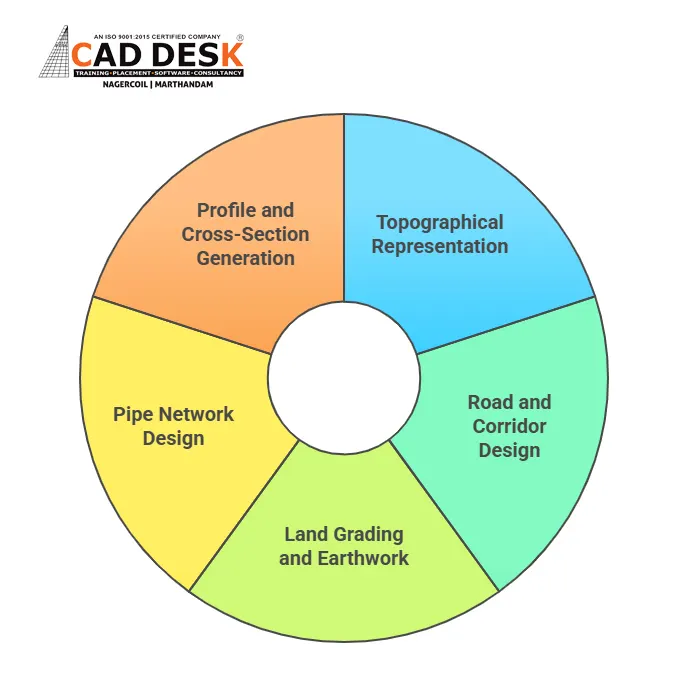
This makes Civil 3D ideal for engineers involved in large-scale projects such as highways, town planning, and infrastructure development.
Why Civil 3D Is in High Demand
Civil 3D is widely used by consulting firms because it reduces manual errors, improves overall design accuracy, and saves a significant amount of time through automated design processes. Its ability to work with intelligent, data-driven models also supports BIM and modern infrastructure workflows. As civil engineering projects continue to grow in scale and complexity, having strong Civil 3D skills greatly enhances career opportunities and makes engineers more valuable in today’s competitive job market.
For learners who want hands-on exposure to both AutoCAD and Civil 3D, professional training programs focused on real-world civil workflows are highly beneficial. You can explore structured learning options here.
AutoCAD vs Civil 3D: Core Differences
The table below clearly explains the AutoCAD vs Civil 3D differences in a simple and practical way:
Feature | AutoCAD | Civil 3D |
Software Type | General CAD software | Specialized civil engineering software |
Design Approach | Drafting-based | Model-based and data-driven |
Primary Use | 2D drawings and documentation | 3D infrastructure design |
Object Intelligence | Basic objects (lines, arcs) | Intelligent civil objects |
Automation | Minimal | High-level automation |
Surface Modeling | Not available | Fully supported |
Road Design | Manual drafting | Automated corridor modeling |
Quantity Calculation | Manual | Automatic and accurate |
Learning Difficulty | Easy for beginners | Moderate to advanced |
Ideal For | Students and entry-level engineers | Professional civil designers |
This comparison highlights why both tools are important in a civil engineer’s career and why learning both offers a strong advantage.
Which Software Should Civil Engineers Learn?
The right choice depends on your experience level.
Beginners and Students
AutoCAD is ideal because it helps build:
● Drafting accuracy
● Drawing standards knowledge
● Basic civil design understanding
Professionals and Career Growth
Civil 3D is recommended if you want to:
● Work on infrastructure projects
● Handle real-world design data
● Move into advanced civil design roles
In today’s industry, engineers who understand both AutoCAD for civil engineering and Civil 3D as a 3D civil software are more employable.
Career Scope with AutoCAD and Civil 3D
AutoCAD skills help you start your career, while Civil 3D skills help you grow it. Together, they prepare you for roles such as:
● CAD Draftsman
● Civil Design Engineer
● Infrastructure Planning Engineer
● Highway and Road Design Engineer
Mastering modern civil CAD software is no longer optional, it’s essential.
Conclusion
The debate between AutoCAD vs Civil 3D isn’t about which software is better, it’s about how they work together. AutoCAD builds strong drafting foundations, while Civil 3D enables advanced, data-driven civil design. For civil engineers aiming for long-term success, learning both tools is the smartest approach.
If you’re confused about which software to learn first or want expert guidance on civil CAD career paths, feel free to connect with us. Our team can help you choose the right training and direction based on your goals.
Frequently Asked Questions
The main difference between AutoCAD and Civil 3D lies in how designs are created and managed. AutoCAD is a general drafting tool used mainly for 2D drawings and basic 3D work, while Civil 3D is a specialized civil CAD software that uses intelligent, data-driven models. Civil 3D automatically updates profiles, sections, and quantities when changes are made, making it better suited for large infrastructure and land development projects.
Yes, AutoCAD is enough for civil engineering students at the beginner level. It helps students understand drafting standards, construction drawings, layers, and annotation techniques. AutoCAD for civil engineering builds a strong technical foundation that is essential before learning advanced tools. However, to meet industry expectations and work on real infrastructure projects, students are encouraged to learn Civil 3D after mastering AutoCAD basics.
Civil 3D is important because it is designed specifically for civil engineering projects such as roads, land development, and drainage systems. As a 3D civil software, it allows engineers to work with real-world data, automate design processes, and generate accurate quantities. This reduces errors and saves time. Civil 3D is widely used by consulting firms, making it a valuable skill for career advancement.
AutoCAD can be used for basic road design drawings, such as alignments, cross-sections, and layout plans. However, all calculations and updates must be done manually. For complex road projects involving profiles, surfaces, and earthwork calculations, Civil 3D is more efficient. Civil 3D automates road corridor modeling and dynamically updates related drawings, which is why it is preferred for professional infrastructure design.
Civil 3D is more complex than AutoCAD because it involves model-based design, surfaces, alignments, and data management. AutoCAD is easier to learn and is ideal for beginners. However, once civil engineers understand AutoCAD fundamentals, learning Civil 3D becomes easier. With proper training and practice, engineers can effectively master Civil 3D and apply it to real-world civil engineering projects.
Both AutoCAD and Civil 3D have strong career scope, but Civil 3D offers more growth opportunities in advanced roles. AutoCAD is essential for entry-level drafting and site documentation jobs, while Civil 3D is preferred for design engineers working on infrastructure projects. Engineers who know both civil CAD software tools are more competitive and have access to a wider range of job roles.
Yes, civil engineers benefit greatly from learning both AutoCAD and Civil 3D. AutoCAD helps with drafting, detailing, and understanding drawing standards, while Civil 3D supports advanced design, automation, and modeling. Many companies expect engineers to switch between both tools depending on project requirements, making combined knowledge a strong advantage in the civil engineering industry.
Civil 3D is commonly used for infrastructure projects such as highways, roads, land development, drainage systems, and urban planning. These projects require surface modeling, profiles, and quantity calculations, which Civil 3D handles efficiently. Its intelligent design features make it suitable for large-scale and data-intensive projects where accuracy and automation are critical.
Yes, AutoCAD is still highly relevant in modern civil engineering. Many construction drawings, approvals, and site documents are created and shared in AutoCAD format. AutoCAD for civil engineering remains essential for drafting, detailing, and coordination work. Even with advanced software like Civil 3D, AutoCAD continues to play a key role in daily engineering workflows.
AutoCAD should be learned first because it teaches drafting fundamentals, drawing standards, and basic civil design concepts. Once these basics are clear, learning Civil 3D becomes much easier. Starting with AutoCAD and then moving to Civil 3D provides a structured learning path and prepares civil engineers for both entry-level and advanced design roles in the industry.