
How AI Is Changing CAD Software and What Students Should Learn
Quick Summary:
1. Automates Repetitive Design Tasks — AI handles drafting, dimensioning, and error detection, allowing designers to focus more on creativity and problem-solving.
2. Enables Generative and Optimised Design — AI can generate multiple design options based on constraints like weight, material, and strength, improving efficiency and innovation.
3. Provides Real-Time Feedback and Simulations — AI-powered CAD tools offer instant performance insights, helping students understand design impact early.
4. Improves Design Accuracy and Reduces Errors — Smart validation tools catch conflicts, weak structures, and missing constraints before they become costly mistakes.
5. Transforms the Designer’s Role, Not Replaces It — AI supports designers rather than replacing them, shifting their role toward strategic thinking, creativity, and decision-making.
Artificial intelligence is no longer just a popular term. It’s actively reshaping the tools students use to design buildings, machines, and products. Today, artificial intelligence in CAD is making software faster, smarter, and more intuitive than ever before. AI is changing CAD by automating time-consuming tasks like drafting, dimensioning, and error checking, while also enabling generative design that creates multiple optimised design options based on defined constraints. In addition, AI-powered tools now provide real-time feedback, simulations, and performance predictions, helping designers make better decisions early in the design process.

How AI Is Changing CAD Software
AI is transforming CAD from a manual drafting tool into a smart design assistant. Here’s exactly how that happens.
1. Generative Design Creates Multiple Design Options
Generative design is one of the most powerful changes AI has introduced into CAD. Instead of manually creating a single model, students can now define design goals such as weight, strength, material, and cost, along with constraints like size limits, load conditions, and manufacturing methods. The AI then generates multiple design variations automatically. This approach helps students understand how different design choices impact performance and efficiency, rather than focusing only on drawing individual shapes.
2. Intelligent Error Detection and Design Validation
Traditional CAD depends largely on manual checking, which can be time-consuming and prone to human error. With artificial intelligence, CAD software can now automatically identify weak structural areas, overlapping or conflicting components, missing dimensions or constraints, and violations of design rules. This early detection helps prevent costly mistakes later in the design process and allows students to understand and correct errors instantly. As a result, learning becomes faster, smoother, and far less frustrating for beginners.
3. Smart Auto-Completion and Drafting Assistance
AI supports everyday modelling by automatically completing sketches, suggesting accurate dimensions, and aligning components with minimal manual input. It can also predict what the user is likely to draw next based on previous actions and design context. This intelligent assistance speeds up the design process and reduces repetitive effort, allowing students to spend less time struggling with software commands and more time understanding core design principles, experimenting with ideas, and improving the overall quality and efficiency of their designs.
4. Faster Simulation and Performance Prediction
AI significantly speeds up simulations such as stress analysis, thermal behaviour testing, fluid flow evaluation, and material optimisation within CAD software. Instead of waiting for hours to run complex calculations, students can now receive feedback in just a few minutes. This faster turnaround allows them to test multiple design ideas, compare performance outcomes, and make improvements quickly. As a result, students gain a clearer understanding of cause-and-effect relationships and can learn through practical experimentation rather than slow trial-and-error methods.
5. AI-Based Design Optimisation
AI helps optimise designs by analysing multiple performance factors at once, such as achieving minimum weight, maximum strength, lower material usage, and reduced production cost. Instead of relying only on trial and error, students can use AI to compare different design options and instantly see which version performs better under real-world conditions. This allows them to understand the impact of every design decision and learn not just how to create a working model, but how to build a solution that is efficient, reliable, and well-optimised.
Will AI Replace CAD Designers?
One of the most common fears among students today is whether AI will replace CAD designers, but in reality, AI replaces tasks, not people. AI excels at handling repetitive modelling, running calculations and simulations, checking for errors, and recognising patterns far faster than any human can. However, humans remain far better at creative thinking, interpreting real-world problems, understanding user needs, and making ethical and practical design decisions. Design is not just about drawing geometry; it is about solving meaningful problems in the real world, something that still requires human judgment and responsibility. While AI can generate options and optimise models, it is the designer who decides what actually makes sense, what fits the context, and what best serves the user. This shift means designers are becoming more like strategic thinkers and creative leaders, while AI takes care of technical execution. Students who learn how to collaborate with AI, rather than compete with it, will stay relevant, adaptable, and highly valuable in the future of design.
What Students Should Learn Now
To succeed in a world where AI and CAD work together, students should focus on these areas:
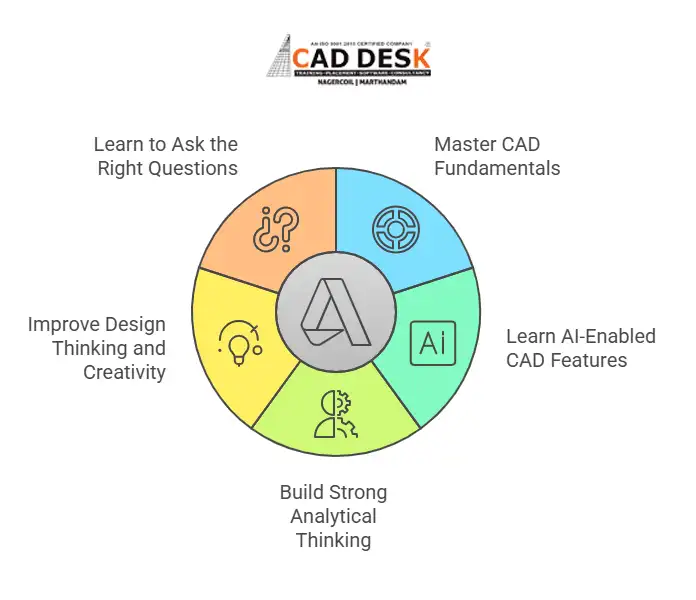
1. Master CAD Fundamentals First
Before using AI-powered tools, students must build a strong foundation in core design concepts. This includes understanding 2D drafting principles, 3D modelling workflows, and the correct use of dimensions, tolerances, and constraints, along with basic knowledge of materials and manufacturing processes that influence how designs are created and produced.
If you’re new to CAD, this guide is a great starting point: What is CAD? Why Every Engineering Student Must Learn CAD in 2025
2. Learn AI-Enabled CAD Features
Students should actively explore generative design tools, AI-assisted simulations, and automated optimisation features within modern CAD software. These technologies help analyse multiple design possibilities, improve performance, and reduce errors, allowing students to create more efficient and innovative designs, not just work faster, but work smarter.
3. Build Strong Analytical Thinking
Understanding why a design works is more important than simply knowing how to draw it. Students should learn how to read simulation results, interpret performance data, and compare design trade-offs. This helps them make informed decisions, improve design quality, and create solutions that are both efficient and practical.
4. Improve Design Thinking and Creativity
AI can generate many design possibilities, but humans decide which direction makes sense. Students should focus on building user-focused thinking, learning how to clearly frame problems, and developing creative exploration habits so they can turn AI-generated options into practical, meaningful, and innovative design solutions.
5. Learn to Ask the Right Questions
AI works based on the quality of the input it receives; the clearer the input, the better the results. Students must learn how to define accurate constraints, set meaningful design goals, and critically validate AI-generated suggestions to ensure the outcomes are practical, reliable, and aligned with real-world requirements.
Conclusion
Artificial intelligence is not replacing CAD; it’s redefining it. Understanding artificial intelligence in CAD, learning exactly how AI is changing CAD software, and developing the right skills early will help students stay confident and capable. The real question isn’t whether AI will replace CAD designers. It’s whether designers are willing to evolve with their tools.
If you’d like guidance on learning modern CAD tools or AI-assisted design workflows, feel free to reach out through the contact page. The future belongs to designers who combine human creativity with machine intelligence, and that journey starts with learning the right way today.
Frequently Asked Questions
AI is used to automate drafting, detect errors, generate design alternatives, run simulations, and optimise designs based on performance, cost, and material constraints.
AI is making CAD smarter by adding automation, real-time analysis, generative design, and predictive simulations that improve speed, accuracy, and decision-making.
No. AI replaces repetitive tasks, not designers. Human creativity, judgment, and problem-solving remain essential in design work.
Generative design uses AI to automatically create multiple design options based on defined goals and constraints like weight, strength, and material usage.
Students should learn AI in CAD to stay relevant, work faster, design better solutions, and adapt to modern engineering and design workflows.
Yes. Understanding core CAD principles and tools is essential before effectively using AI-powered design features.
Students should focus on design fundamentals, analytical thinking, creativity, problem-solving, and understanding how to interpret AI-generated results.
Not necessarily. AI often simplifies workflows by reducing manual steps, but students still need a strong understanding of design concepts.
Yes. Beginners can benefit from AI assistance, but learning the basics of drafting, modelling, and constraints is still important.
The future of CAD involves more automation, smarter design assistance, faster simulations, and closer collaboration between human designers and AI tools.